
Advanced
Configuring Knowledge & Memory
Learn how to manage your agent's long-term memory and knowledge base for more personalized interactions.
March 18, 2024
6 min read
Configuring Knowledge and Long-Term Memory
Long-term memory allows your agent to remember past interactions and learn from them, providing a more personalized and consistent experience.
How Long-Term Memory Works
By default, Long-Term Memory is enabled for all new agents. This means the agent will automatically store relevant information from your conversations and recall it when needed.
Managing Memories
You have full control over what your agent remembers.
- Open the Agent Configuration modal.
- Navigate to the "Memory" tab.
- Here you can view a list of all stored memories.
- You can edit or delete specific memories if they are incorrect or no longer relevant.

Adding Knowledge
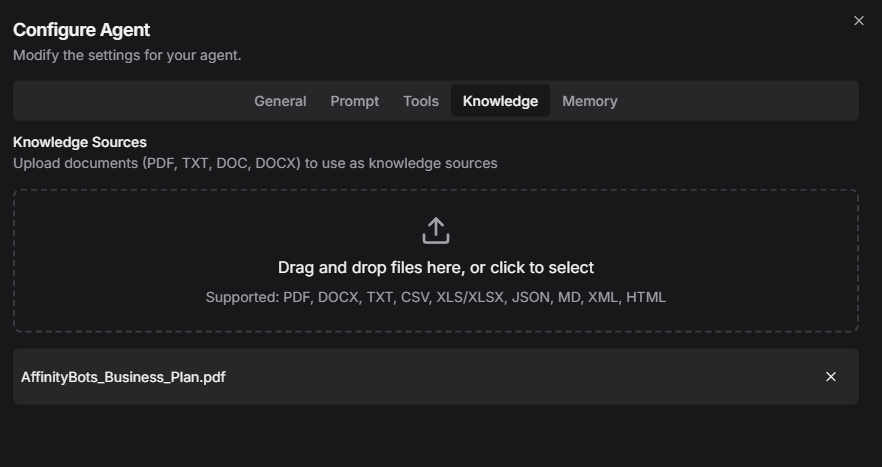
Besides learning from conversations, you can explicitly provide knowledge to your agent.
- Upload Documents: You can upload PDF, TXT, or MD files to the agent's knowledge base.
- Add Text Snippets: You can directly paste important information that the agent should always know.
Best Practices
- Review Regularly: Periodically check your agent's memory to ensure it's retaining accurate information.
- Prune Irrelevant Data: Delete memories that are no longer useful to keep the agent focused.
- Be Explicit: When adding knowledge, ensure it is clear and unambiguous.
[!IMPORTANT] Sensitive information should be handled with care. While memories are private to your agent, avoid storing highly sensitive personal data unless necessary.